MoonTerminal · Reports and statistics ·
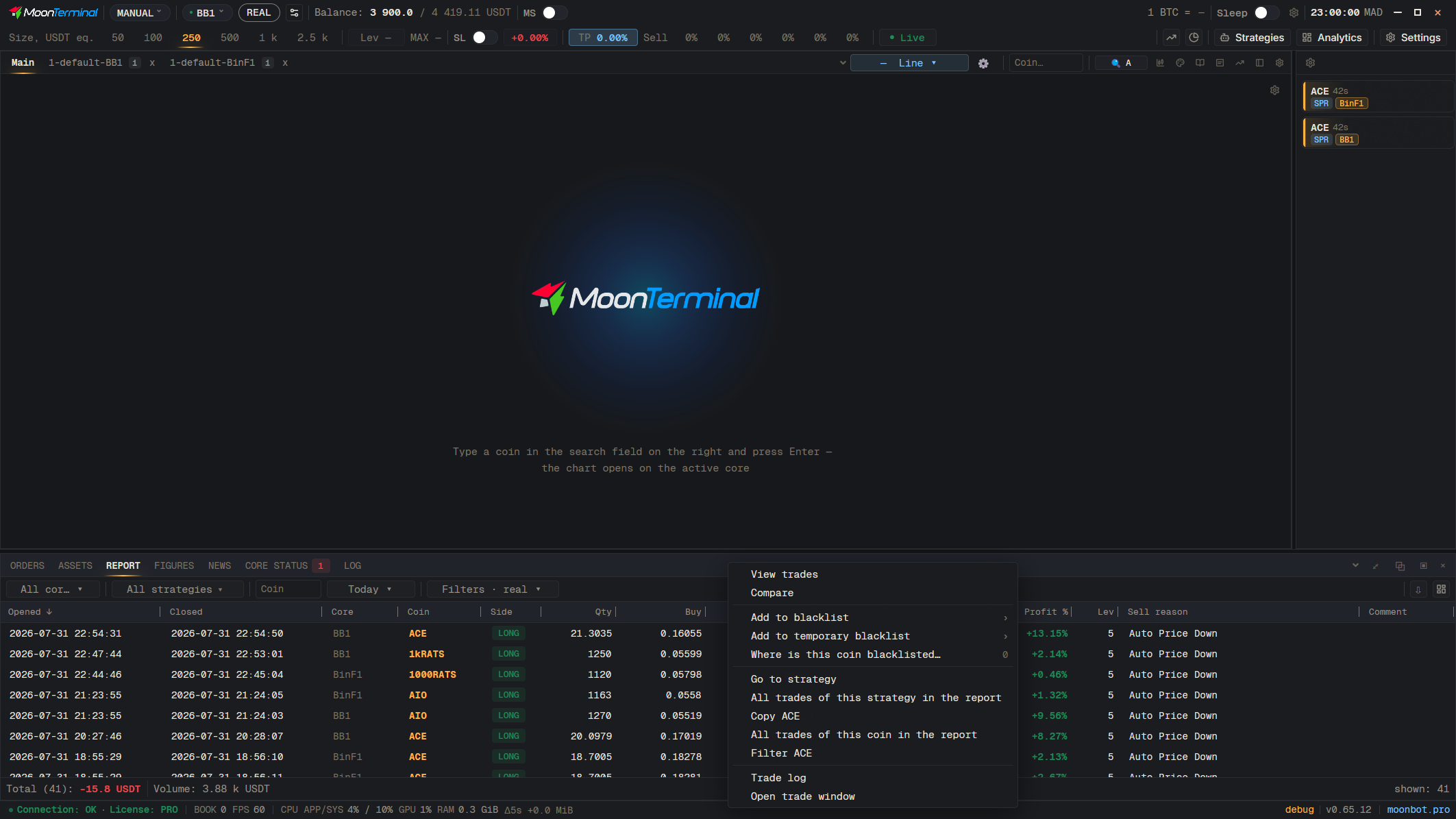
Right-click a row in “Report”. “Copy ACE” puts the ticker on the clipboard exactly as it is written in the “Coin” column. “All coin trades in report” opens a separate “Report” window: the core of this trade, period “All”, all strategies, only closed trades, and the “Coin” field holds the exact ticker with a space. If the window is already open, it is reconfigured and a second one does not appear; the list in the main “Report” stays as it was. “Filter ACE” exists only in the main “Report” itself: it enters the ticker into the “Coin” field of this same table, and the period and strategies do not change. “Copy” and “All coin trades in report” are also in the coin menu in “Orders”, “Assets”, “Screener” and on the order line on the chart. If the row has a strategy, the item “All strategy trades in report” in the same menu opens this window by strategy on its core: for all time, both sides, all coins.
- Report
- Right-click: BB1 ACE LONG Auto Price Down — Right mouse button
- All trades of this coin in the report — Row menu item