MoonTerminal · VPS and Linux ·
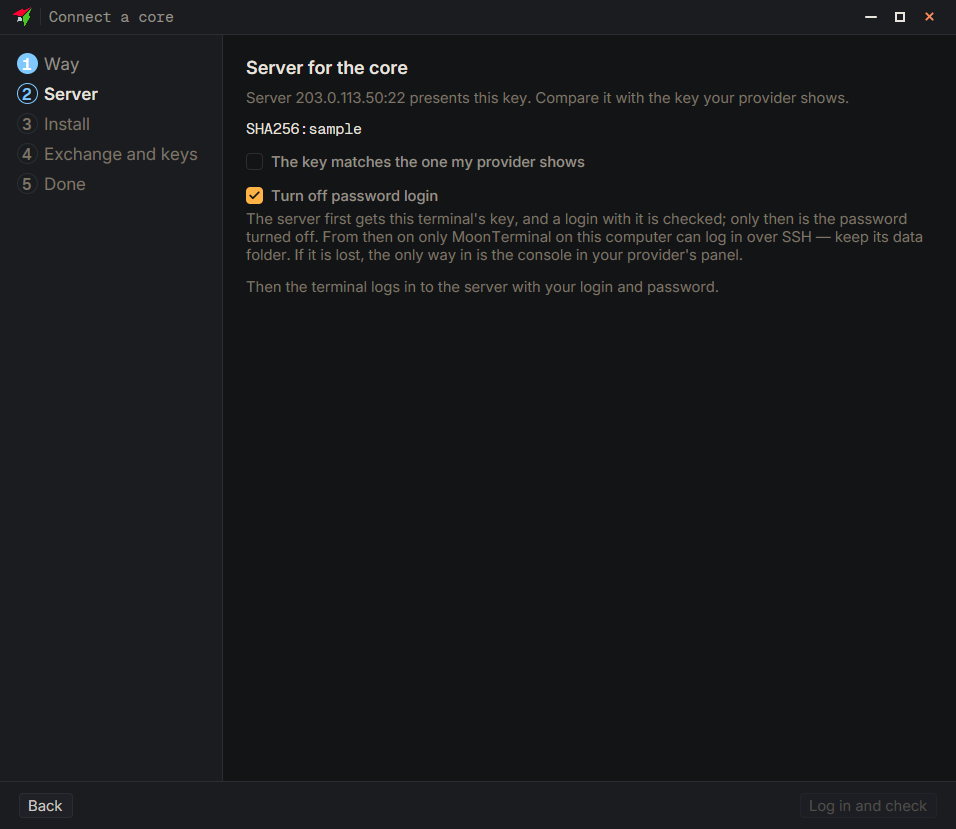
With the “Disable password login” checkbox, on the step where the wizard shows the server key. It is there when installing a new core and when moving a core to a Linux server, and it is ticked by default. The password is disabled after the core is installed. If you logged in with a key (“Log in with a key”), that key remains the login. If you logged in with the provider's password, the terminal first installs its own key on the server, checks with a new connection that the key is accepted, and remembers the server. From then on the wizard, core commands and a second core on this server log in with that key by themselves, no password needed. In that case only MoonTerminal on this computer will be able to log in to the server over SSH, so keep its data folder: if it is lost, only the console in the provider's panel will remain. Root login with a key remains. The wizard writes the outcome to the log: “Password login disabled”, “already disabled” or “not disabled”, with the reason. In that last case the server stays as it was. A non-root login is closed only if sudo on the server works without a password. The file /etc/ssh/sshd_config.d/00-moon-password.conf, if you created it yourself so that the terminal could log in by password, is set aside rather than deleted.
- Settings
- Connect a core…
- New core on a Linux server
- Check the server — After the IP address, login and password
- Turn off password login