MoonTerminal · Hotkeys ·
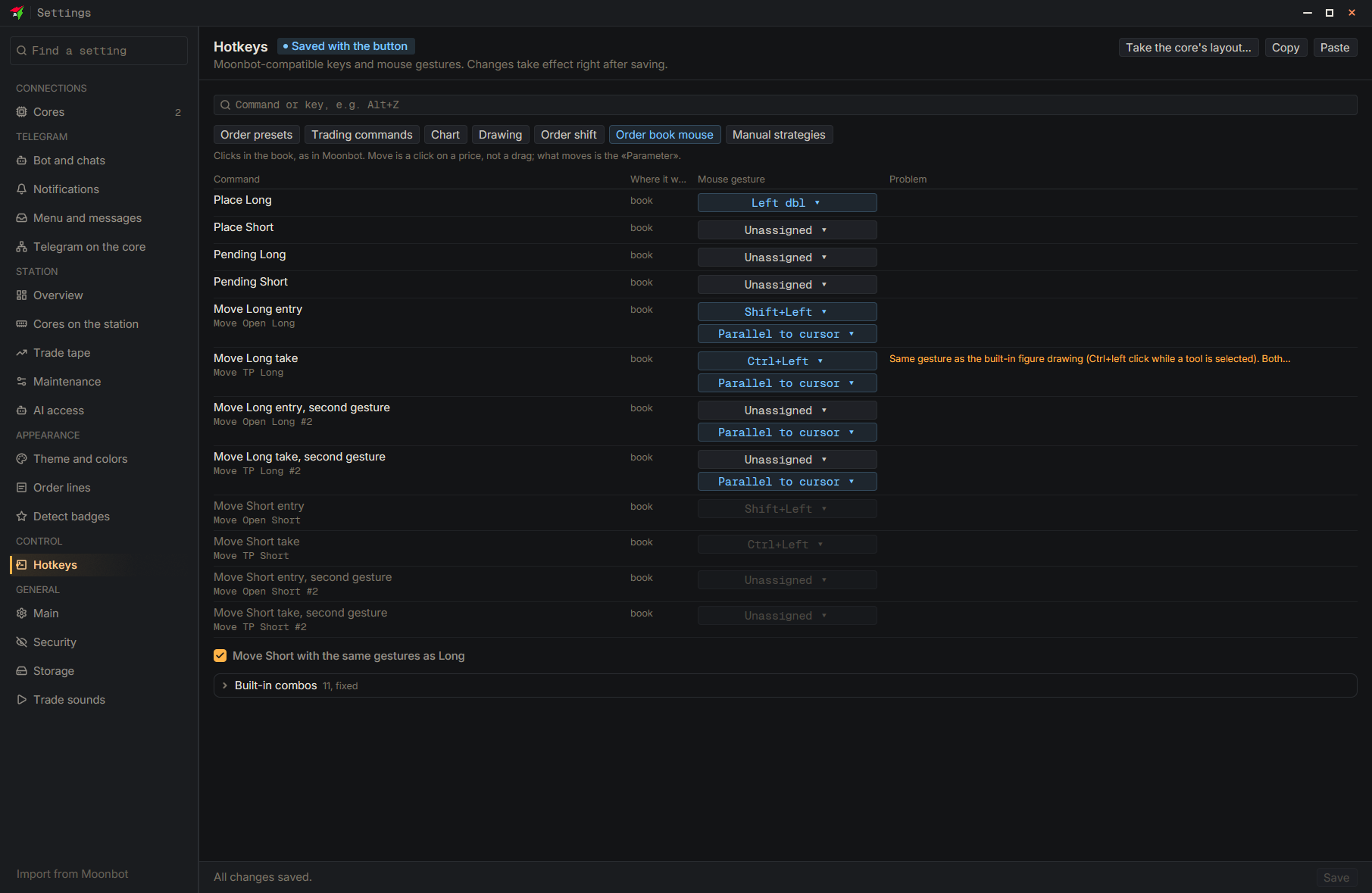
Yes. One gesture can be assigned to both the take move and the entry move, as in Moonbot's additional commands. In the “Order book mouse” group pick the same gesture, for example Middle, for the rows “Move Long take, second gesture” and “Move Long entry, second gesture”, choose under each what to move, for example “Last Moved”, and press “Save”. A click on a price in the order book goes to the move that has orders on the market: while a take profit stands, the take profit moves, and when there is none, the entry orders move. The rows are checked in order: take, entry, then the second gestures. Such a pair is not a conflict: both rows get an amber note “Same gesture as…”. The red “Will not fire” stays on two rows that move the same orders, for example “Move Long entry” and “Move Long entry, second gesture” on one gesture.
- Settings
- Hotkeys
- Order book mouse
- Move Long take, second gesture — Pick a gesture, for example Middle, and choose below it what to move
- Move Long entry, second gesture — The same gesture
- Save — At the bottom of the settings window