MoonTerminal · Connecting cores ·
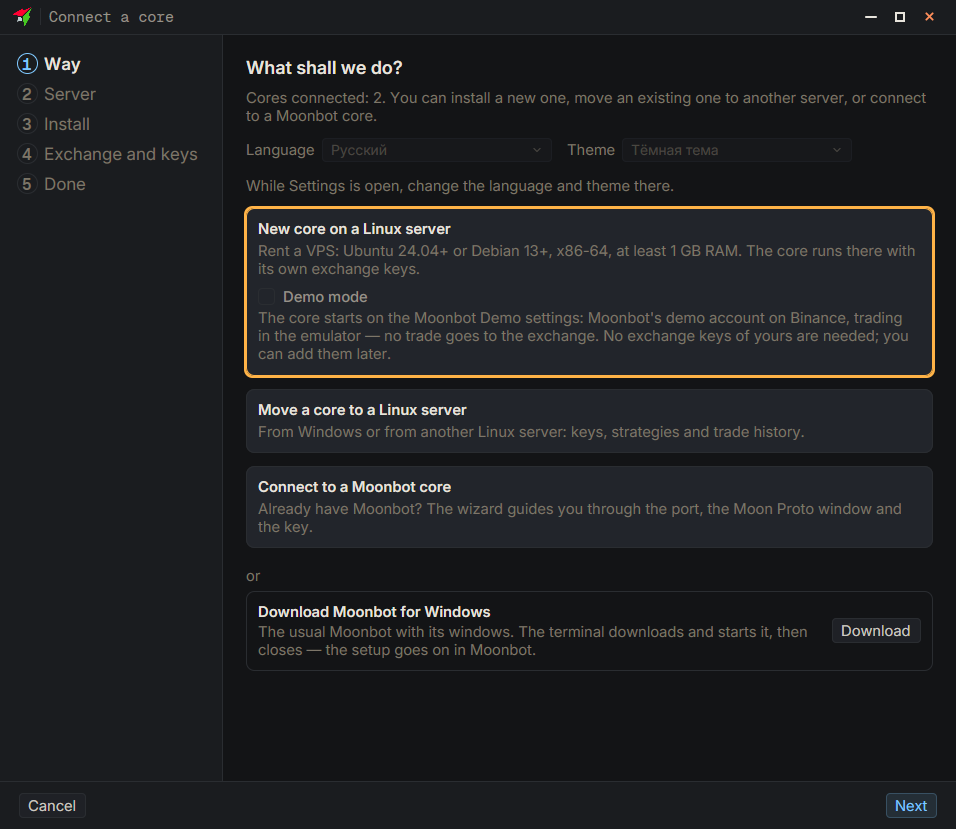
Yes, with the “Demo mode” checkbox. In “Settings” click “Connect a core…”, choose “New core on a Linux server”, tick “Demo mode” in this same panel and click “Next”. The core is installed with Moonbot Demo settings: a Moonbot demo account on Binance, trading in the emulator, so trades do not go to the exchange. Your own exchange keys are not needed; the wizard skips the keys step and connects the core itself. The server must be the same as for a regular core: a rented VPS with Ubuntu 24.04 or Debian 13 or newer, x86-64, at least 1 GB of memory. Exchange keys in a demo installation belong to Moonbot and cannot be changed. If the core's login to the exchange failed, check again later or click “Connect my own keys”. You can switch to your own account later too: in “Settings” right-click the core in the list and choose “Exchange API keys…”.
- Settings
- Connect a core…
- New core on a Linux server
- Demo mode — Checkbox in the same panel, then “Next”